10 Essential Tips for Using Thermal Paper Effectively?
In today's fast-paced world, effective use of Thermal Paper can significantly enhance business operations. This specialized paper, commonly found in receipts and tickets, requires proper handling to ensure optimal performance. Understanding the nature of Thermal Paper is crucial for anyone who relies on it daily.
Many users overlook the importance of storage conditions and printer settings. Improper handling can lead to smudged prints or fading over time. Recognizing these nuances demonstrates a level of expertise that can set businesses apart. Users should also consider the environmental impact of Thermal Paper, encouraging a thoughtful approach to its use.
Realizing the potential challenges can lead to better practices. By implementing specific strategies, companies can avoid common pitfalls associated with Thermal Paper. With the right knowledge, anyone can elevate their usage of this resource, maximizing efficiency and effectiveness in their operations.
Understanding Thermal Paper: Definition and Uses
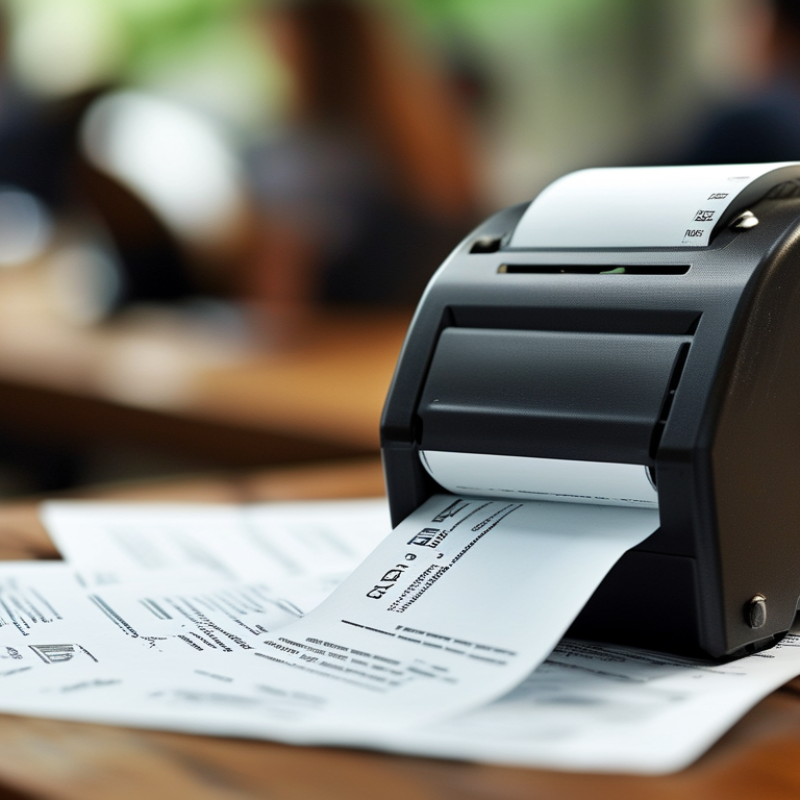
Thermal paper is a special type of paper that changes color when exposed to heat. This unique characteristic makes it ideal for printing receipts, tickets, and labels. The paper contains a dye and a developer, which react when heated by a thermal print head. Thus, there is no need for ink or toner. This can lead to cost savings and less waste in various applications.
Understanding the applications of thermal paper is crucial. It is widely used in retail and hospitality for receipts. However, long-term exposure to light and heat can fade the printed information. Proper storage conditions are essential. Users often overlook this, leading to lost receipts or faded labels. Awareness of the material's limitations can improve its effectiveness. Regular checks are recommended to ensure that you are not printing on degraded paper. Proper handling reflects a professional approach, ensuring that important information remains clear and accessible.
Choosing the Right Thermal Paper for Your Printer
Choosing the right thermal paper for your printer is crucial for optimal performance. Different types of printers require specific thermal paper grades. According to a report by the International Journal of Advanced Manufacturing Technology, using incorrect paper can lead to poor print quality and increased costs. For instance, low-quality paper can cause smudging and fading, rendering important receipts unreadable.
Consider the weight and thickness of the paper. Standard thermal paper ranges between 55 to 70 GSM, affecting durability and print clarity. If you're printing high-volume transactions, choosing a heavier paper can increase longevity. Selecting the right size is also essential. A mismatch can waste paper and create unnecessary costs.
Tip: Always test the paper before bulk purchasing. This helps assess compatibility. Research indicates that up to 30% of businesses experience issues due to improper paper selection. Be mindful of the environmental impact as well. Many thermal paper manufacturing processes are not eco-friendly. Balancing quality and sustainability requires careful consideration.
Comparison of Different Types of Thermal Paper
Storage and Handling Tips for Thermal Paper
Proper storage and handling of thermal paper is crucial for maintaining its quality and longevity. Industry reports indicate that improper conditions can lead to print fading within a few weeks. Thermal paper should be stored in a cool, dry place, away from any direct sunlight. Humidity can adversely affect the thermal coating, making the paper prone to discoloration and reduced print quality. Ideally, keep it between 10°C and 25°C. This is essential to ensure optimal performance and durability.
Handling thermal paper with care is also important. Avoid touching the surface of the paper, as oils from fingers can lead to print issues later. Additionally, it should not be stored alongside chemicals or solvents, as they can react with the thermal coating. According to recent studies, paper stored in inappropriate conditions can lose up to 50% of its readability. As businesses and users often overlook these aspects, attention to detail in storage and handling is vital for achieving the best results. By being mindful of these factors, users can extend the life and effectiveness of their thermal printing needs.
Common Issues with Thermal Paper and How to Fix Them
Thermal paper is widely used for receipts, labels, and tickets. However, common issues can hinder its effectiveness. One frequent problem is fading prints. This occurs due to exposure to heat, light, or moisture. Storing thermal paper in a cool, dry place can help combat this. Avoid placing it near windows or heaters, as direct sunlight or excessive warmth accelerates fading.
Another common issue is paper jams. Jams can happen if the thermal paper is loaded incorrectly. Ensure that the paper is placed correctly in the printer. Regularly check for dust or debris in the printer's feed mechanism. Cleaning the print head may also improve performance. A dirty print head can produce unclear prints, which frustrates users.
Finally, static electricity can lead to static cling issues, making it difficult to separate sheets of paper. To mitigate this, consider using anti-static sprays or humidifying the environment. A slight increase in humidity can help reduce static issues. These practical steps validate the importance of understanding thermal paper use, ensuring a smoother experience.
10 Essential Tips for Using Thermal Paper Effectively
| Tip Number |
Tip |
Common Issues |
Solutions |
| 1 |
Choose the Right Thermal Paper |
Fading prints |
Use high-quality thermal paper |
| 2 |
Store in a Cool, Dry Place |
Paper damage from heat and humidity |
Store in a climate-controlled environment |
| 3 |
Regularly Check Printer Settings |
Printing errors |
Adjust printer settings for paper type |
| 4 |
Keep Rolls Clean and Dust-Free |
Poor print quality |
Wipe down printer and rolls regularly |
| 5 |
Check Expiration Dates |
Prints that disappear |
Use paper before its expiration date |
| 6 |
Avoid Direct Sunlight |
Faded prints |
Keep paper away from direct sunlight |
| 7 |
Use the Correct Printer |
Incompatibility issues |
Ensure printer is designed for thermal paper |
| 8 |
Avoid Excessive Handling |
Marks and streaks on prints |
Handle paper only by edges |
| 9 |
Use Thermal Print Settings |
Blurry or illegible prints |
Activate thermal print mode in settings |
| 10 |
Dispose of Used Paper Properly |
Environmental concerns |
Recycling options for thermal paper |
Best Practices for Printing on Thermal Paper
Printing on thermal paper requires attention to detail for optimal results. Quality control is essential. Studies indicate that poorly managed thermal printing can lead to 20% more waste. Ensure your thermal printer is in good condition to minimize errors. Regular maintenance contributes significantly to performance.
When preparing to print, choose the right settings. Adjust the heat level properly. Too much heat can darken the print, while too little may lead to fading. It’s recommended to perform test prints. This simple step helps in identifying the perfect heat setting.
Store thermal paper correctly to maintain its quality. Keep it away from direct sunlight and humidity. Both conditions can damage the paper and affect print clarity. Additionally, use a clean and dry workspace. Dust can settle on paper and interfere with printing. Remember, the environment plays a vital role in the outcome of your prints. Balancing these factors will ensure effective use of thermal paper, enhancing both durability and clarity of your prints.


 +86-15362608169